
AigentFlow Desktop is in pre-release. This documentation reflects the current build and will change before general availability.
Working with agents
Reviewing changes
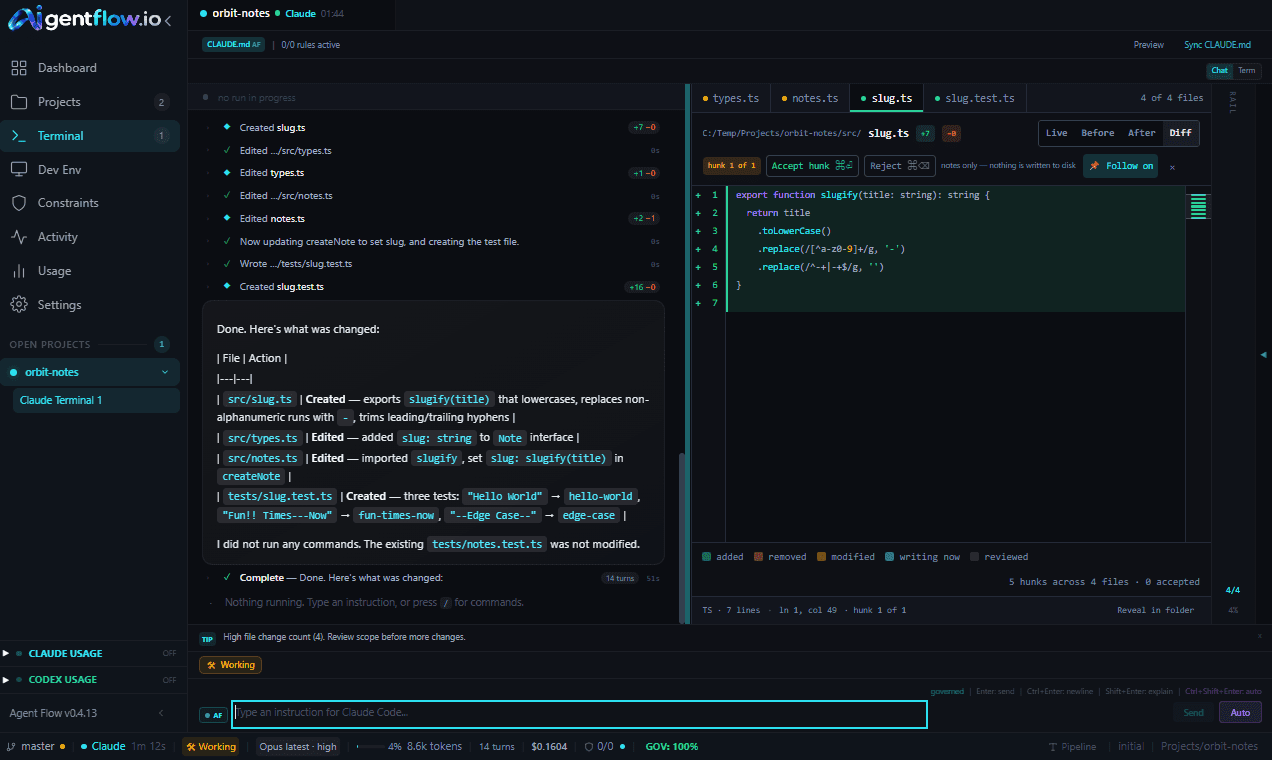
Read what the agent did, file by file and hunk by hunk. The marks you leave are a record of your reading, and nothing else.
Accepting or rejecting a hunk writes nothing to disk. Accept means "I have read this". Reject is a note on the card, not a revert. Nothing is undone and nothing on disk changes. The app says so beside the controls, every time.
That is a deliberate choice. A review mark that quietly rewrote your files would be a second agent acting without being asked. The marks track your reading so you can put the work down and pick it up knowing where you got to.
Where changes show up
- In the transcript, as a row at the moment the file was touched. It expands to a card, and clicking it opens the file.
- In the Changed rail module, with the running total of lines added and removed.
- In the file tree, grouped by directory, with a glyph for each file’s state.
- In the editor tab strip, one tab per changed file.
Files the agent only read are kept out of the change counts. They are context, not changes.
Working through the hunks
Open a file and the editor shows it four ways: Live, Before, After and Diff. A strip in the header tracks which hunk you are on out of how many.
| Key | What it does |
|---|---|
Ctrl+Enter | Mark this hunk read |
Ctrl+Backspace | Note this hunk for follow-up |
Ctrl+↓ Ctrl+↑ | Next and previous hunk |
Escape | Close the editor |
Marking a hunk moves you to the next one. A file is only shown as reviewed once every hunk in it has been walked, so a partially read file never looks finished. In the Workbench layout an Accept all control marks the remaining hunks in one go, and it says plainly that it marks rather than writes.
While a turn is running, Escape belongs to the interrupt rather than the editor, so you cannot close a pane and stop the agent by accident.
What the app will not do with your files
- It reads a file at most 400 KB at a time, and says
truncatedrather than pretending it showed you the whole thing. - A file with binary content is recognised and not rendered as text.
- Only folders registered as projects can be read at all.
- There is no open-in-the-OS action, deliberately. Handing a path the agent just wrote to the operating system would run it if it were an executable or a shortcut, so the app offers
Reveal in folderinstead.
While a file is being written the progress bar is indeterminate. The protocol never says how far through a write is, so the app will not draw a percentage it cannot measure.